Showing posts with label iPhone. Show all posts

Tuesday, November 25, 2008

New iPod Touch faster than iPhone 3G

The second-generation iPod Touch uses a slightly faster processor than the iPhone 3G.

(Credit: Apple)

Apple appears to have upped the processing speed of the iPod Touch in order to help it go after the portable-game market.

Touch Arcade reports that the applications processor inside the 2nd Generation iPod Touch unveiled in September is actually running faster than the processor inside the iPhone 3G, which runs at the same speed that the original iPhone and iPod Touch used. The new iPod Touch's ARM-based processor is running at 532MHz, while the iPhone 3G's processor runs at 412MHz.

A game developer interviewed by Touch Arcade noticed a huge difference in 3D-rendering speed as a result of the speed bump. As fondly from the "megahertz madness" days of the Intel-AMD competition in the PC, processor speed is not the only measure of performance, but it is an important one.

With the arrival of the App Store, Apple has been marketing the latest iPod Touch as a gaming device in its latest round of commercials, almost completely ignoring the fact that it's a music and video player as well.

It seems that Apple has room to boost the clock speed of the processor to 620MHz, according to ARM's specifications, but that requires striking a balance between performance and battery life.

Tuesday, November 18, 2008

Google 'Voice Search' hands-on verdict: Awesome

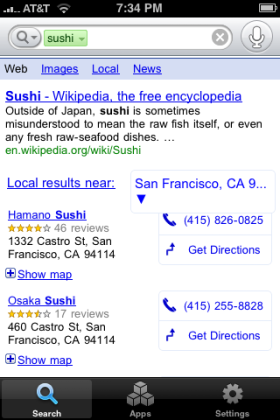
The new voice-activated Google Mobile app for the iPhone is finally here. Whatever the reason for the delay, it was worth the wait.The search app knows when you bring the phone to your face to speak into it. It beeps, you talk, and it executes a Google search on what you said. (If you're using a headset, you have to press a button. You can type in your queries, too, if you want.)

It is freakishly accurate. It's not perfect, but it's extremely good. Good enough to be used frequently, I'd say, although this review is based on only 15 minutes of experimentation.

I searched for names of people I knew, businesses nearby, airline information, and other miscellaneous data. The service bungled one nearby restaurant, but got everything else right. It uses the phone's location data to narrow down results. Try searching for "sushi" and you'll get your closest sushi restaurants at the top of your search results.

speech-results

The Google Mobile app gives you its answers in text, which makes for a very quick experience. If your result returns phone numbers, you can dial the phone by clicking on one. But if you're driving in your car and need a quick connection, use Goog411 instead, which is a full voice-in, voice-out experience.

As others have noted, Google Mobile doesn't let you do voice dialing from your own contact list. It's frustrating to be able to search the entire Web with your voice but not be able to search your own phone. But it's still a useful and very cool little service.

To get the app, go to this link or visit the iTunes Application Store and search for "Google Mobile App." As I write this, the description for the page is old, but the app you get is the new one.

if you enjoy voice recognition technology, go and visit:

http://www.vingtalk.com/cpp

they offer text-to-voice conversion and vice-versa for your text and voice mail!

Monday, November 3, 2008

Apple iTunes8 Review-Fast transfers with style and charishma


The new version of iTunes is here..Download here

Those of you owning an ipod or iphone sure must have tried their hands on the iTines applications for music transfer.Yes!Like you all, even we got our hands on the iTunes and thought it could be worthwhile to review it and take a look at it from a technical
aspect. So here’s presenting a review of the iTunes 8 (Software Version 1.1.8 ) application.

Apple has been known to provide crisp products that in pride about their stylish and chic looks. Now here we are speakingof a software application, yet the company manages to present their style and charm through the software platform. Starting off with the
review, the application is surely easy to install but one might need a tutorial on how to use it.

Just connect your iPod to the computer and the iTunes application will start off automatically on the computer. Import music on to the music libraries and synchronizing becomes an easier task with a click of a button. Segregate the files on the basis of music, videos,TV shows and Podcasts.


As far as usability is concerned, drag and drop functions can surely help. The access to the iTunes store is again one good source of entertainment, one can download songs, games,
podcasts and a lot more. This is surely one application that transfers data on an efficient, quick and in a trendy manner.Speaking of downsides of this application, it can sure get
cumbersome to import files such as video/movie files. The Application once connected to a computer and once transfers are done to the iPod/iPhone, the user has to continue using the same desktop where he/she has installed iTunes on. If a user tries to transfer files from
iTunes stored in a different desktop, the user will loose all the files saved on the iPod/iPhone. Now that’s surely one drawback none of us would like. The software application is definitely not suited for the ones new to technology topics